agents@dealhack$fetch the freshest Joom codes…
Current Joom Promo Codes for August 2026
✓agent-verified & updated·August 14, 2026
Today's Best Joom Coupon Codes:
16 offers in totalSave 10% Off Storewide at Joom
Take 10% off storewide at Joom with this coupon code.
agent score 94/100passed 121 of 123 agent checks
Take 12% Off Your Joom Order
Save 12% on your Joom order when you check out using this code.
agent score 90/100passed 77 of 80 agent checks
Get 10% Off Your Joom Order
Apply this discount code to save 10% on your eligible Joom purchases.
agent score 87/100passed 65 of 68 agent checks
Save 40% Off at Joom
Enjoy 40% off on eligible Joom purchases with this code.
agent score 50/100
Score 25% Off at Joom
Take 25% off qualifying Joom orders when you use this coupon code.
agent score 47/100
Take 60% Off Joom Orders
Use this promo code to save 60% on eligible Joom purchases.
agent score 31/100
Save 5% on Joom Orders
Use this coupon code to save 5% on your next Joom orders.
agent score 25/100passed 87 of 88 agent checks
Monthly Deals: Limited-Time Discounts on Select Categories
Joom's homepage currently features Monthly Deals sections across categories such as seasonal shoes, budget finds, home and kitchen, men's style, DIY, accessories, beauty, and school supplies. Select products shown on the page display limited discount availability and date ranges such as July 27 to August 1.
Daily Deals: Cart Discounts on 6+ Eligible Items
Joom Daily Deals can apply discounted pricing when the required deal conditions are met. Joom's help content notes that the discount may not apply if eligible deal items sell out or if fewer than six items are selected in the cart.
Almost Free: Selected Products for €0.10 for App Winners
Registered Joom app users can enter for selected promotional products and, if chosen, buy the item for €0.10. Winners must place the order within the allowed post-notification window and submit a photo review after receiving the product to participate again.
Special Price: Extra Discounts When You Buy 3+ Eligible Items
Get promotional pricing on items marked with a lightning bolt when you purchase at least three items in one payment. The discounted price applies to eligible promotional items in the cart when the purchase conditions are met.
Monthly Deals: Budget Finds and Category Sale Picks
Jooms homepage highlights Monthly deals across categories such as budget finds, home and kitchen, mens style, beauty, and accessories. The listings include current discounted products and limited-quantity sale items.
Monthly Deals: School Supplies With Limited-Quantity Discounts
Jooms School Supplies monthly deals page lists stationery, office, and school-related items at promotional prices. Select products show remaining discounted quantities within the promotion collection.
Monthly Deals: Seasonal Shoes With Limited-Quantity Discounts
Jooms Seasonal Shoes monthly deals page features discounted footwear with limited quantities shown on select items. Eligible products are listed directly in the promotion collection with current sale pricing.
Free Gift With Purchase on Eligible Products
Joom has a dedicated Free Gift With Purchase selection where each listed product includes a bonus gift. The gift details are available by selecting the gift icon on eligible products in the promotion collection.
Almost Free Promo: Selected Products for €0.10
Registered Joom app users can apply for selected Almost Free products and, if chosen, buy the item for €0.10. Users may submit requests for up to two products per day, and winners have six days after notification to complete the purchase.
Joom Shopping Info
Discounts
Shipping & Returns
Payments
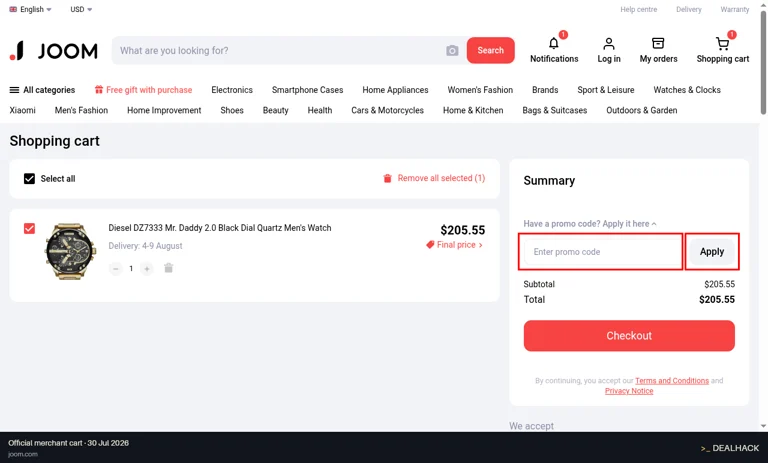
Locate the Code Box at joom.com
The agents tested the code. Entering it is the one part we leave to you — here's exactly where the Joom promo code goes at checkout.
Follow the shopper-submitted screenshots below to spot the Joom promo box and apply your code. Miss a step and even a working code does nothing — so the agents mapped every one for you.
How to find
- 1.Go to the joom.com homepage
- 2.Search for any product and add one item to the cart
- 3.Navigate to the cart page by clicking the 'Shopping cart' icon
- 4.Locate the 'Summary' section on the right side of the page
- 5.Click on the link 'Have a promo code? Apply it here' to reveal the input field
- 6.Find the promo code input box with the placeholder 'Enter promo code'
How to use
Type the code into the 'Enter promo code' field in the Summary section and click the 'Apply' button.
How the Agents Verify Joom Codes
Joom Customer Support
Need help with your shopping? Here's what's available for Joom when an order, return, or promo code needs a human.