$40
OFF
$40 Off Storewide at Skylum
worked at checkout
Use this coupon code to get $40 off storewide at Skylum.
agents@dealhack$fetch the freshest Skylum codes…
✓listings updated·
Use this coupon code to get $40 off storewide at Skylum.
Use the promo code on your first purchase to save 10%. The offer is described as limited-time, but no end date is specified.
Sign up for Skylum's newsletter and verify your email to receive a code for 20% off Luminar Neo.
Enjoy 60% off eligible Skylum purchases when you use this promo code.
Black Friday pricing on Luminar lifetime licenses: Desktop Only $99 (regularly $417), All Platforms $139 (regularly $477), and Max $159 (regularly $546). Desktop Only and All Platforms include 365 days of AI tools; Max includes one year of Luminar Prime, which renews annually unless canceled. Confirm current terms and pricing at checkout.
Eligible students, teachers, new parents, charity workers, low-income customers, people with disabilities, first responders, healthcare workers, and military personnel may qualify for over 20% off. Verification or other eligibility requirements may apply, and the discount varies.
Enable optional auto-upgrades at checkout to get 20% off. They are free for the first year and then renew at a fee.
New Luminar Neo perpetual purchases include an automatic upgrades add-on free for the first year. Access paid feature updates and generative tools during the included year. The add-on renews at a separate price after.
Skylum offers personalized discounts to customers who already own Luminar Neo or another Skylum product. Eligible shoppers need to log in to their Skylum account to view the custom purchase offer available to them.
Skylum lists the X Membership Subscription at $39, reduced from $59. The membership includes access to over 1,200 creative assets, monthly new items, video courses, and member Marketplace discounts.
X Members receive exclusive Marketplace savings, including 30% off Team Skylum asset bundles and 15% off any items in the Luminar Marketplace. Membership also includes access to creative assets, monthly item drops, and educational content.
Students and tutors can access discounted pricing on Luminar Neo by using a valid student ID or educational document. The offer is part of Skylums ongoing discount program for education users.
Eligible military personnel can get reduced pricing on Luminar Neo after providing proof of service. The discount applies to Skylum photo editing software and is listed as one of Skylums ongoing savings offers.
Skylum lists the Perpetual Max License at $179 compared with a $549.97 reference value. The plan includes desktop access, mobile app access, Creative Library access, creative add-ons, and a Luminar Neo video course in the order summary.
Skylum lists the Cross-Device Perpetual License at $159 compared with a $385 reference price. The package includes desktop access, mobile app access, creative add-ons, and a Luminar Neo video course in the displayed order summary.
Recurring events worth timing an order around. Windows shift year to year, so treat them as a shopping calendar rather than a fixed date.
Skylum hosts massive sitewide discounts on Luminar Neo lifetime licenses, software bundles, and extension packs during the late November holiday window.
Annual promotional event featuring introductory pricing packages and special upgrade discounts for existing software users kicking off the new year.
A seasonal promotion offering bundle savings and exclusive preset collections alongside reduced pricing on major software editions.
The agents tested the code. Entering it is the one part we leave to you. Here's exactly where the Skylum promo code goes at checkout.
Follow the shopper-submitted screenshots below to spot the Skylum promo box and apply your code. Miss a step and even a working code does nothing, so the agents mapped every one for you.
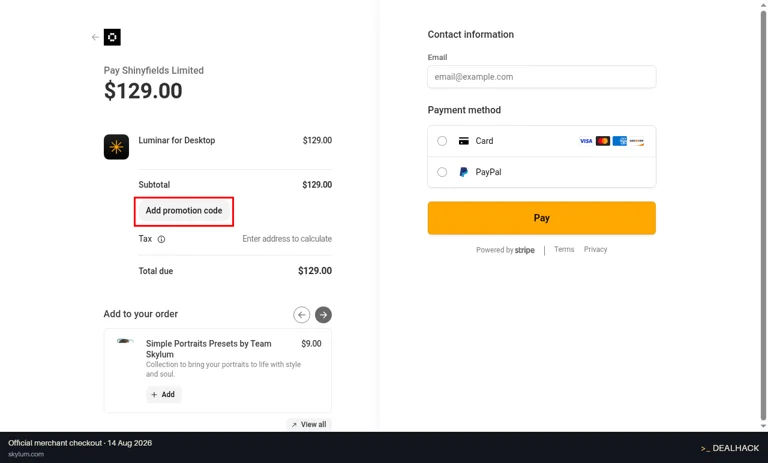
Captured by our checker on skylum.com's own checkout, showing where the Skylum promo code goes.
Type the code into the 'Add promotion code' input field and click the 'Apply' button.
Our agents log every new Skylum promo code and deal the day it goes live, and record what the working ones took off a real cart. Here's how many landed each month over the past year, how deep the discounts ran, and when it pays to wait.
busiestavg 2/mo
| Month | New offers |
|---|---|
| 1 | |
| 2 | |
| 0 | |
| 0 | |
| 1 | |
| 0 | |
| 3 | |
| 1 | |
| 7 | |
| 5 | |
| 2 |
What shoppers ask most about Skylum.
Possibly. A code worked at the Skylum checkout 11 days ago, but none of the codes listed now has been confirmed in the last 14 days.
Promotional coupon codes never apply to subscription renewals, third-party plug-ins, or digital assets purchased through the Skylum Marketplace. Discount codes are restricted exclusively to initial software license purchases and specific standalone promotional software editions.
Student verification is processed securely through Student Beans, issuing a unique single-use code for checkout. Re-verification via your active institutional credentials is required periodically to maintain eligibility for discounted annual renewals.
Subscriptions auto-renew annually unless canceled prior to the billing date through your Skylum account preferences. Canceling a subscription stops future billing cycles while retaining full access to software features until the conclusion of the paid term.
Skylum does not offer price matching against third-party authorized resellers or retroactive price adjustments if an item goes on sale after purchase. Customers may alternatively exercise the 30-day money-back guarantee to repurchase at a newly discounted rate.
Nothing goes up here on trust. A Skylum code is collected, applied to a real skylum.com cart, dated the last time it took money off an order, scored on what came back, and pulled once it stops clearing. Promotions have no code to run through a checkout, so those are dated when they go live and dropped when they lapse. Here is how far that has got on this page, and every change the agents logged along the way.
Each entry is a change the agents logged on this page, newest first.
$40 off code rescored
1/100 code confidence (early read, few checks so far) · 1 of 1 check worked · 1 signal
2 new offers added
1 to paste at checkout, 1 that need no code
$40 off code retested at checkout
applied to a live skylum.com cart
2 new offers added
1 to paste at checkout, 1 that need no code
60% off code rescored
odds of working recalculated
$40 off code worked on a live skylum.com cart
1/100 code confidence (early read, few checks so far) · 1 of 1 check worked · 1 signal
60% off code worked on a live skylum.com cart
the store took it and the total went down
Not every Skylum code reaches us from the store. 1 code on this page was first submitted by a shopper. Wherever a code comes from, it still has to pass the same cart test before it goes up here.
Send it over and the agents will run it through a real skylum.com cart. If it works, it lands here with the test behind it.
Open any Skylum code above and tell us whether it worked. It takes one tap, no sign-up, and a code that keeps failing gets pulled off the page.
Rate a codeNeed help with your shopping? Here's what's available for Skylum when an order, return, or promo code needs a human.
Customer support is handled exclusively via online contact forms and ticketing.
Who you're buying from.
Skylum was originally founded in 2008 as Macphun by Dmitry Sytnik and Paul Muzok.
The company changed its name from Macphun to Skylum in 2017 to reflect its expansion into Windows software development.
Luminar Neo serves as Skylum's flagship modular photo editing application powered by proprietary artificial intelligence features.
These 12 stores sell products similar to Skylum. Below you can see the best coupon or deal available at each one today, so you can compare prices before you buy. 9 of them have a promo code you can copy at checkout.
 Wondershare10% off
Get an extra 10% off eligible single-product purchases, including select PDFelement, EdrawMax, EdrawMind, UniConverter, and Filmora plans. Product and plan restrictions apply.
 Acer10% off
Use this discount code to save 10% on your first Acer purchase as a new customer.
 Roxio10% off
Save 10% on Roxio products when you apply this coupon code at checkout. Discount typically excludes upgrades and items already discounted by more than 10%.
 GoDaddy Canada
Get a free domain for one year with an eligible annual Airo AI Builder, Web Hosting, or Managed WordPress plan. The domain renews at the standard rate after the initial term; an ICANN fee may apply.
 Kittl50% off
Apply the code to save 50% on annual Pro and Expert plans. This limited-time offer has no stated end date.
 Surfshark81% off
Save 81% and get 3 extra months free on eligible Surfshark plans using this code.
 Keeper Security30% off
New customers save 30% on the first year of Keeper Unlimited or Family plans with this code at checkout. Applies to personal plans only.
 Dynadot$8.99
Use this Dynadot promo code to register a new.COM domain for $8.99 for the first year; standard renewal pricing applies after the first year.
 ScalaHosting72% off
Get eligible managed cloud plans for $11.21 per month on a 1-year term, with up to 72% off. New plans, additional plans, and upgrades qualify, but renewals are excluded.
 AOMEI Technology20% off
Use the code for 20% off eligible server and higher lifetime editions, including specified Backupper, Partition Assistant, Onekey Recovery, and Centralized Backupper plans.
 Avira40% off
Free Avira users can take 40% off one eligible premium product when upgrading. Check product eligibility and terms at checkout.
 Zenfolio60% off
Use this coupon code to save 60% on Professional or Advanced annual plans at Zenfolio.
 Camping World
 Cyberlink
 Society6
 Babylist
 Roots
Roots AtomStack
 Hello Nancy
 Kylie Cosmetics
 Holland & Barrett
 Slice
Slice