agents@dealhack$fetch the freshest Crypto.com codes…
$100 Off Crypto.com Coupons August 2026
✓agent-verified & updated·August 18, 2026
Today's Current Crypto.com Coupons and Promo Codes:
17 offers in totalCRO Trader Prize Draw: Win a Crypto.com Arena Trip for Two
Eligible participants can make at least AU$100 in CRO net buys during the campaign period for prize draw entries. Prizes include weekly AU$200 AFL Store vouchers and a final Crypto.com Arena trip package for two with flight, accommodation, and event-ticket vouchers.
Grid Rally: Win F1 Paddock Club Tickets and Up to $1,500 in BTC
Eligible Crypto.com App users can join the Grid Rally Campaign and make at least $200 in CRO net buys during the campaign period. Top-ranked participants can receive BTC prizes, and eligible U.S. participants may be entered for a pair of F1 Paddock Club tickets.
Up to $300 in CRO With a New Visa Signature Credit Card
New Crypto.com Visa Signature Credit Card holders can earn a CRO welcome bonus after opening a card and meeting the qualifying spend requirement within the first 90 days. Reward tiers include $100, $200, or $300 in CRO depending on the card tier and spend threshold met.
Up to $100 in Exchange Trading Fee Credits
New Crypto.com Exchange users can earn trading fee credits by completing onboarding milestones in sequence. Eligible actions include creating an account, completing KYC, making a qualifying deposit, and reaching the first trade requirement within 30 days of sign-up.
Up to $180 in New User Mystery Box Rewards
New eligible Crypto.com App users can unlock up to four mystery box rewards by reaching trading volume milestones within 30 days of registration. Eligible trades at $100, $500, $1,000, and $5,000 milestones can earn randomized rewards ranging up to $100 for the top milestone.
Grid Rally: Up to $1,500 in BTC and F1 Paddock Club Tickets
Crypto.com App users can join the Grid Rally Campaign and make at least $200 in CRO net buys during the campaign period. Top eligible traders can win BTC rewards up to $1,500, and select eligible participants can win F1 Paddock Club tickets.
Up to $300 in CRO With a New Crypto.com Visa Signature Credit Card
New Crypto.com Visa Signature Credit Card holders can earn a CRO welcome bonus after opening a card and meeting qualifying spend within the first 90 days. Eligible tiers can receive $100, $200, or $300 worth of CRO depending on the card tier and spend requirement.
First 30 Days Free With Annual Level Up Plus
Crypto.com Level Up Plus lists an annual-plan offer that includes the first 30 days free. Members who join Plus can access listed plan benefits such as zero crypto trading fees on eligible monthly volume and other tier benefits subject to the plan terms.
Up to $180 in Crypto Rewards for New App Users
New Crypto.com App users can unlock rewards during their first 30 days after signing up. Complete verification, make a deposit, and reach eligible trading milestones to receive Mystery Box rewards worth up to $180 total.
FANtasy Trade Campaign: Win a Crypto.com Arena Trip and AFL Vouchers
Eligible participants can enter the FANtasy Trade Campaign by making at least AU$100 in CRO net buys during the campaign period. Prizes include weekly AU$200 AFL Store vouchers and a Crypto.com Arena trip package with flight, accommodation, and event ticket vouchers.
Grid Rally: Win F1 Paddock Club Tickets and Up to $1,500 in BTC
Eligible Crypto.com App users can join the Grid Rally campaign and make at least $200 in CRO net buys during the campaign period. Top leaderboard participants can receive BTC prizes up to $1,500, with F1 Paddock Club ticket prizes also available under the campaign rules.
Crypto.com Visa Signature Card Bonus: Up to $300 in CRO
New Crypto.com Visa Signature Credit Card holders can earn up to $300 worth of CRO after opening a card and meeting qualifying spend within the first 90 days. Reward amounts vary by tier, with published spend thresholds ranging from $1,500 to $5,000.
New User Welcome Bonus: Mystery Boxes Worth Up to $100
Eligible new Crypto.com App users can unlock mystery box rewards by reaching trading volume milestones within their first 30 days. Milestones start at $100 in trading volume and can unlock randomized rewards ranging from $1 to $100 depending on the tier reached.
Up to $100 in Trading Fee Credits for New Exchange Users
New eligible Crypto.com Exchange users can earn trading fee credits by completing onboarding steps, including account creation, KYC, a qualifying first deposit, and a first trade. The default reward structure totals up to $100 in credits, with country eligibility and available steps varying by jurisdiction.
Other Crypto.com Deals & Offers
ONDO Strike Options: Share a $200,000 USDC Rewards Pool
Eligible Crypto.com App users can trade ONDO Strike Options during the campaign period for two reward opportunities. First ONDO Strike Options trades can earn up to $50, and volume milestones can unlock additional USDC rewards while the reward pools last.
ONDO Strike Options: Share a $200,000 USDC Pool
Crypto.com App users can join the ONDO Strike Options Race and trade ONDO Strike Options during the campaign period. Eligible first-time ONDO Strike Options traders can receive $1 per contract up to $50, and users can earn additional USDC rewards by reaching volume milestones.
ONDO Strike Options Race: Earn From a $200,000 USDC Pool
Crypto.com App users can earn USDC rewards by trading ONDO Strike Options during the campaign window. First-trade rewards are capped at $50, while volume milestone bonuses offer rewards for reaching $20, $100, and $500 in total ONDO Strike Options trading volume.
Crypto.com Shopping Info
Discounts
Trial & Refunds
Payments
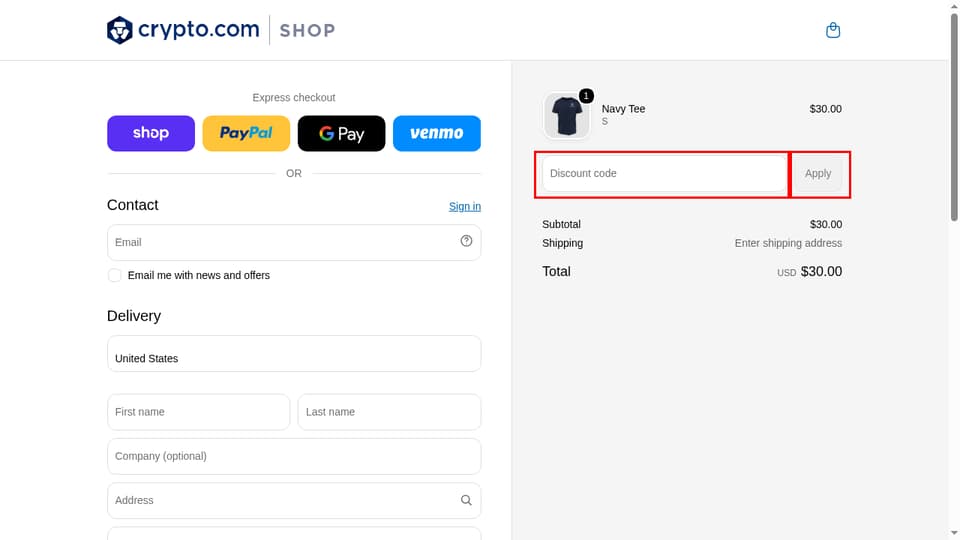
Locate the Code Box at crypto.com
The agents tested the code. Entering it is the one part we leave to you — here's exactly where the Crypto.com promo code goes at checkout.
Follow the shopper-submitted screenshots below to spot the Crypto.com promo box and apply your code. Miss a step and even a working code does nothing — so the agents mapped every one for you.
How to find
- 1.Go to the merchant homepage at shop.crypto.com
- 2.Select any product and click 'Add to cart'
- 3.Click the 'Check out' button in the cart drawer
- 4.Locate the 'Discount code' input field in the Order Summary on the right side of the checkout page
How to use
Enter the code into the 'Discount code' input field in the Order Summary on the right and click the 'Apply' button.
How the Agents Verify Crypto.com Codes
Crypto.com Customer Support
Need help with your shopping? Here's what's available for Crypto.com when an order, return, or promo code needs a human.